Jean's Blog

一个专注软件测试开发技术的个人博客

0%

Python 30道高频面试及详解

1. 一行代码生成[1,3,5,7,9,11,13,15,17,19]

使用列表生成式,创建列表,观察元素出现规律,代码如下:

1
2
3
>>> a = [ 2*i+1 for i in range(10)]
>>> a
[1, 3, 5, 7, 9, 11, 13, 15, 17, 19]

2.写一个等差数列

产生一个首项为10,公差为12,末项不大于100的列表。

使用列表生成式创建:

1
2
3
>>> a = list(range(10,100,12))
>>> a
[10, 22, 34, 46, 58, 70, 82, 94]

3.一行代码求1到10000内整数和

提供两种方法

  1. 使用Python内置函数sum求和

    1
    2
    3
    >>> s = sum(range(10000))
    >>> s
    49995000
  1. 使用functools模块中的reduce求和

    1
    2
    3
    4
    >>> from functools import reduce
    >>> s = reduce(lambda x,y: x+y, range(10000))
    >>> s
    49995000

4.打乱一个列表

使用random模块,shuffle函数打乱原来列表,值得注意是in-place打乱。

1
2
3
4
5
6
7
8
>>> import random
>>> a = list(range(10))
>>> random.shuffle(a)
>>> print(a)
[1, 2, 7, 8, 4, 5, 6, 3, 9, 0]
>>> random.shuffle(a)
>>> print(a)
[6, 0, 1, 5, 7, 8, 2, 4, 9, 3]

5.字典按value排序并返回新字典

原字典:

1
d = {'a':12,'b':50,'c':1,'d':20}

使用Python的内置函数sorted

1
2
3
4
>>> d = {'a':12, 'b':50, 'c':1, 'd':20}
>>> d = dict(sorted(d.items(), key=lambda item: item[1]))
>>> d
{'c': 1, 'a': 12, 'd': 20, 'b': 50}

6.如何删除list里重复元素,并保证元素顺序不变

给定列表:

1
a = [3,2,2,2,1,3]

如果只是删除重复元素,直接使用内置set函数,使用set函数是达到了去重目的,但是不能保证原来元素顺序。

1
2
3
>>> a = [3,2,2,2,1,3]
>>> set(a)
{1, 2, 3}

下面的方法,列表删除某个元素后,后面的元素整体会向前移动。

1
2
3
4
5
6
7
8
9
10
11
12
13
14
def del_duplicated(a):
ac = a.copy()
b = []
for index, i in enumerate(ac):
if i in b:
del ac[index]
else:
b.append(i)
return ac


a = [3, 2, 2, 2, 1, 3]
r = del_duplicated(a)
print(r)

执行结果

1
2
3
4
/Users/lvjing/PycharmProjects/python_base_project/venv/bin/python /Users/lvjing/PycharmProjects/python_base_project/interview_sample_01.py
[3, 2, 2, 1]

Process finished with exit code 0

正确做法:

1
2
3
4
5
6
7
8
9
10
11
def del_duplicated(a):
b = []
for i in a:
if i not in b:
b.append(i)
return b


a = [3, 2, 2, 2, 1, 3]
r = del_duplicated(a)
print(r)

执行结果

1
2
3
4
/Users/lvjing/PycharmProjects/python_base_project/venv/bin/python /Users/lvjing/PycharmProjects/python_base_project/interview_sample_01.py
[3, 2, 1]

Process finished with exit code 0

7.怎么找出两个列表的相同元素和不同元素?

给定列表a=[3,2,2,2,1,3],列表b=[1,4,3,4,5],使用集合,找出相同元素:

1
2
3
4
5
6
7
8
9
10
def ana(a, b):
aset, bset = set(a), set(b)
same = aset.intersection(bset)
differ = aset.difference(bset).union(bset.difference(aset))
return same, differ


a = [3, 2, 2, 2, 1, 3]
b = [1, 4, 3, 4, 5]
print(ana(a, b))

执行结果:

1
2
3
4
/Users/lvjing/PycharmProjects/python_base_project/venv/bin/python /Users/lvjing/PycharmProjects/python_base_project/interview_sample_01.py
({1, 3}, {2, 4, 5})

Process finished with exit code 0

8.字符串处理成字典

输入串"k0:10|k1:2|k2:11|k3:5",输出字典{k0:10,k1:2,....}

  • 第一层split,根据分隔符|,分割出k0:10,k1:2,k2:11,k3:5
  • 第二层split,根据分隔符:,分割出新字典的键值对

使用字典生成式,得到结果,也就是一个新字典:

1
2
3
>>> m = map(lambda x: x.split(':'), 'k0:10|k1:2|k2:11|k3:5'.split('|'))
>>> {mi[0]:int(mi[1]) for mi in m}
{'k0': 10, 'k1': 2, 'k2': 11, 'k3': 5}

9.输入日子,判断这一天是这一年的第几天?

使用datetime模块,提取日期date对象,调用timeuple()方法,返回一个struct_time对象,属性tm_yday便是这一年的第几天:

1
2
3
4
5
6
7
8
>>> from datetime import datetime
>>> def get_day_of_year(y,m,d):
... return datetime(y,m,d).date().timetuple().tm_yday
...
>>> get_day_of_year(2022,4,27)
117
>>> get_day_of_year(2022,12,31)
365

10.遍历目录与子目录,抓取.py文件

os模块、walk方法实现地柜遍历所有文件,os.path.splitext返回文件的名字和扩展名,如果扩展名匹配到ext,则添加到res中。

1
2
3
4
5
6
7
8
9
10
11
12
13
14
import os


def get_files(directory, ext):
res = []
for root, dirs, files in os.walk(directory):
for filename in files:
name, suf = os.path.splitext(filename)
if suf == ext:
res.append(os.path.join(root, filename))
return res


print(get_files('.', '.py'))

11.单机4G内存,处理10G文件的方法?

假定可以单独处理一行数据,行间数据相关性为零。

  • 方法一:使用Python内置模板,逐行读取到内存

    • 使用yield,好处是解耦读取操作和处理操作

      1
      2
      3
      4
      def python_read(filename):
      with open(filename, 'r', encoding='utf-8') as f:
      for line in f:
      yield line
  • 以上每次读取一行,逐行 迭代,逐行处理数据

    1
    2
    3
    4
    if __name__ == '__main__':
    g = python_read('./data/a.txt')
    for c in g:
    print(c)
缺点:逐行读入,频繁的IO操作拖累处理效率。那么,是否有一次IO,读取多行的方法呢?接下来查看方法二。
  • 方法二:Pandas包中的read_csv函数

    • 关于单机处理大文件,read_csv的chunksize参数能做到,设置为5,意味着一次读取5行。

      1
      2
      3
      4
      5
      6
      7
      8
      9
      10
      11
      12
      13
      14
      15
      16
      17
      18
      import pandas as pd


      def pandas_read(filename, sep='', chunksize=5):
      reader = pd.read_csv(filename, sep=sep, chunksize=chunksize, engine='python')
      while True:
      try:
      yield reader.get_chunk()
      except StopIteration:
      print('---Done----')
      break


      if __name__ == '__main__':
      g = pandas_read('./data/a.txt', sep="::")
      for c in g:
      print(c)

以上就是单机处理大文件的两个方法,推荐使用方法二,更加灵活。

12.统计一个文本中单词频次最高10个单词

使用yield解耦数据读取python_read和数据处理process

  • python_read:逐行读入
  • process:正则替换掉空字符,并使用空格,分隔字符串,保存到defaultdict对象中。
1
2
3
4
5
6
7
8
9
10
11
12
13
14
15
16
import re
from collections import defaultdict, Counter


def python_read(filename):
with open(filename, 'r', encoding='utf-8') as f:
for line in f:
yield line


d = defaultdict(int)


def process(line):
for word in re.sub('\W+', " ", line).split():
d[word] += 1

使用两个函数,最后,使用Counter类统计出频次最高的10个单词:

1
2
3
4
5
for line in python_read('./data/a.txt'):
process(line)

most10 = Counter(d).most_common(10)
print(most10)

执行结果

1
2
3
4
/Users/lvjing/PycharmProjects/python_base_project/venv/bin/python /Users/lvjing/PycharmProjects/python_base_project/interview_sample_01.py
[('you', 3), ('la', 3), ('yes', 3), ('no', 2), ('hello', 1), ('world', 1), ('nice', 1), ('to', 1), ('meet', 1), ('no1', 1)]

Process finished with exit code 0

13.反转一个整数,例如-12345 -> -54321

  1. x位于(-10,10)间,直接返回,单个数字无需反转(反转结果一样)
  2. 将x转换为字符串对象str
  3. 若x是负数,截取sx[1:],并反转字符串
  4. 若x是正数,直接反转字符串
  5. 使用内置函数int()转化为整数
1
2
3
4
5
6
7
8
9
10
11
12
13
14
15
16
17
18
19
20
21
22
23
def reverse_int(x: int):
# x位于(-10,10)间,直接返回
if -10 < x < 10:
return x
# 将x转换为字符串对象str
sx = str(x)

def reverse_str(sx):
return sx[::-1]

# 若x是负数,截取sx[1:],并反转字符串
if sx[0] == "-":
sx = reverse_str(sx[1:])
x = int(sx)
return -x

# 若x是正数,直接反转字符串
sx = reverse_str(sx)
return int(sx)


print(reverse_int(-123456))

执行结果

1
2
3
4
/Users/lvjing/PycharmProjects/python_base_project/venv/bin/python /Users/lvjing/PycharmProjects/python_base_project/interview_sample_01.py
-654321

Process finished with exit code 0

14.说明以下代码输出结果

此题需注意,内嵌函数foo使用的两个变量i和x,其中x为其形参,i为enclosing域内定义的变量。

扩展知识:enclosing作用域说明,看如下的例子

1
2
3
4
5
6
7
8
9
10
11
12
13
14
15
16
17
18
19
20
21
def deco(func):
str = 'I am deco'

def wrapper():
print(str)
func()

return wrapper


def foo():
print('I am foo')


foo = deco(foo)
foo()
"""
输出:
I am deco
I am foo
"""

从上面的例子看到,对于函数deco中wrapper函数中的print(str)的str查找感到迷惑。这时,就要提到Python作用域的LEGB原则。其中对E(Enclosing)作用域进行说明,在运行如下代码:

1
2
3
4
5
print(foo.__closure__)
"""
输出
(<cell at 0x10e4edfd0: function object at 0x10e3c53a0>, <cell at 0x10e4ed190: str object at 0x10e371530>)
"""

打印出来的内存地址是什么呢?这就是上面wrapper函数引用的外层函数(deco)的两个变量:str和func。也就是说内层函数(wrapper)会把外层函数(deco)做用域里面的对象放到__closure__属性里,以供本身查找。可是不是全部外层函数作用域的对象都会放到内层函数的__closure__属性里,仅限本身用到的,这个__closure__就是enclosing作用域了。

rtn添加三个函数foo,但是并未发生调用。

1
2
3
4
5
6
7
8
9
10
11
12
13
14
15
16
17
def f():
i = 0

def foo(x):
return i * x

rtn = []
while i < 3:
rtn.append(foo)
i += 1
return rtn


# 调用函数f
for fs in f():
print(fs(10))

知道执行fs(10)时,内嵌函数foo才被调用,但是此时的enclosing变量i取值为3,所以输出结果为:

1
2
3
4
5
6
/Users/lvjing/PycharmProjects/python_base_project/venv/bin/python /Users/lvjing/PycharmProjects/python_base_project/interview_sample_01.py
30
30
30

Process finished with exit code 0

15.如下函数foo的调用哪些是正确的?

1
2
def foo(filename, a=0, b=1, c=2):
print('filename:%s \n c:%d' % (filename, c))

已知filename为’.’,c为10,正确为foo函数传参的方法,以下哪些是对的,哪些是错误的?

  • A-foo('.', 10)
  • B-foo('.', 0, 1, 10)
  • C-foo('.', 0, 1, c=10)
  • D-foo('.', a=0, 1, 10)
  • E-foo(filename='.', c=10)
  • F-foo('.', c=10)

分析:

  • A 错误,a被赋值为10
  • B 正确,c是位置参数
  • C 正确, c是关键字参数
  • D 错误,位置参数不能位于关键字参数后面
  • E 正确,filename和c都是关键字参数
  • F 正确,filename位置参数,c是关键字参数

验证测试:

1
2
3
4
5
6
7
8
9
10
11
12
13
14
15
16
17
18
19
20
>>> foo('.', 10)
filename:.
c:2
>>> foo('.', 0, 1, 10)
filename:.
c:10
>>> foo('.', 0, 1, c=10)
filename:.
c:10
>>> foo('.', a=0, 1, 10)
File "<stdin>", line 1
foo('.', a=0, 1, 10)
^
SyntaxError: positional argument follows keyword argument
>>> foo(filename='', c=10)
filename:
c:10
>>> foo('.', c=10)
filename:.
c:10

16.lambda函数的形参和返回值

key值为lambda函数,说说lambda函数的形参和返回值。

1
2
def longer(*s):
return max(*s, key=lambda x: len(x))
  • lambda函数的形参:s解包后元素值,可能取值为:{1,3,5,7}、{1,5,7}、{2,4,6,7,8}三种。
  • lambda函数的返回值为:元素的长度,可能取值为:{1,3,5,7}、{1,5,7}、{2,4,6,7,8}的长度是4,3,5。

17.正则匹配负整数

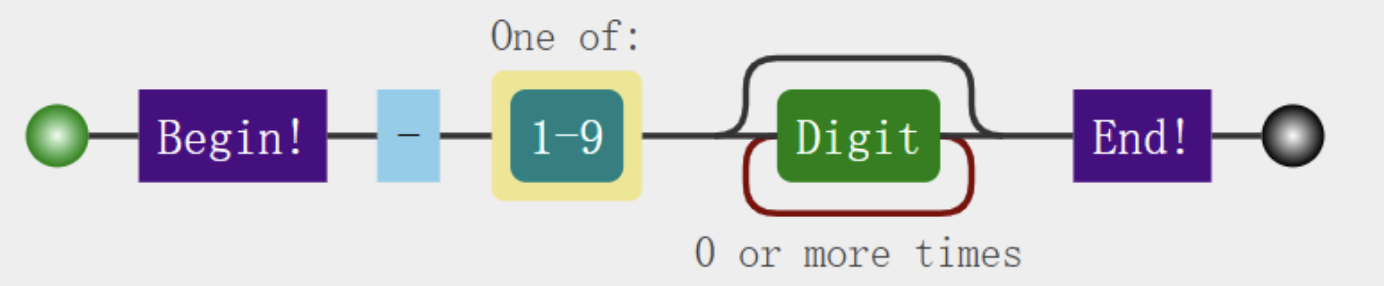
匹配所有负整数,不包括0。正则表达式:^-[1-9]\d*$

  • ^-表示字符串以-开头
  • [1-9]表示数字1到9,注意不要写成\d,因为负整数没有以-0开头的
  • \d*表示数字0到9出现0次、1次货多次
  • $表示字符串已数字结尾

以上分布讲解的示意图,如下所示:

image-20220429111549991

测试字符串

1
2
3
4
5
6
7
>>> import re
>>> s = ['-1', '-15756', '9', '-01', '10', '-']
>>> pat = r'^-[1-9]\d*$'
>>> rec = re.compile(pat)
>>> rs = [i for i in s if rec.match(i)]
>>> print(rs)
['-1', '-15756']

18.正则匹配负浮点数

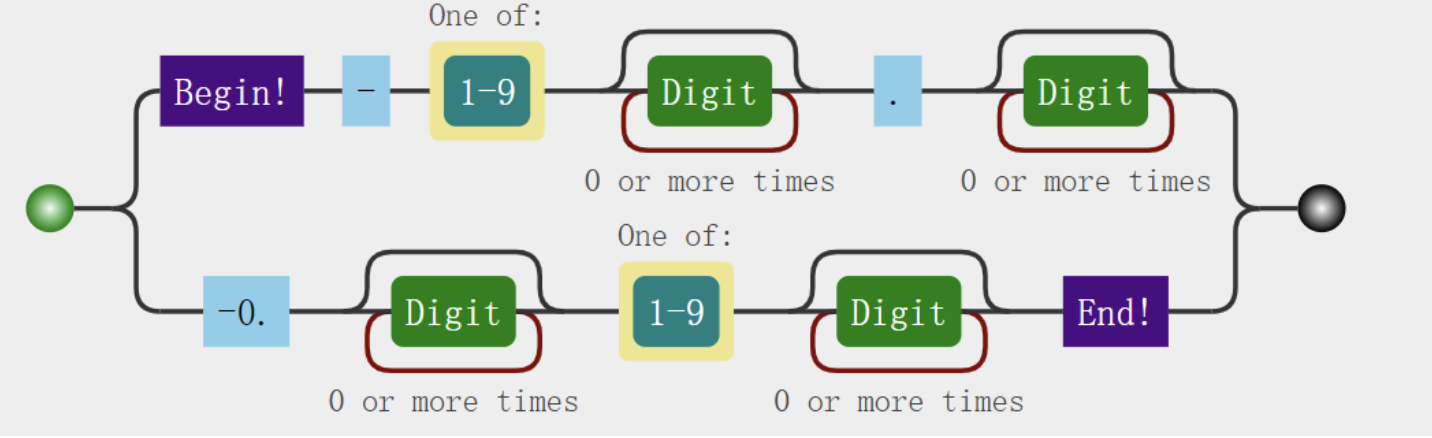
正确写出匹配负浮点数的正则表达式,先要进行分析。

考虑到两个实例:-0.12-111.234,就必须要分为两种情况。

适应实例-0.12的正则表达式:^-0.\d*[1-9]\d*$,注意要考虑到-0.0000这种非浮点数,因此正则表达式必须这样写。

以下几种写法都是错误的

  • ^-0.\d*$
  • ^-0.\d*[1-9]*$
  • ^-0.\d*[0-9]*$

适应实例-111.234的正则表达式:^-[1-9]\d*.\d*$,使用|综合两种情况,故正则表达式为:

1
^-[1-9]\d*\.\d*|-0\.\d*[1-9]\d*$

image-20220429131546829

测试字符串:

1
2
3
4
5
6
7
>>> import re
>>> s = ['-1', '-1.5756', '-0.00', '-000.1', '-1000.10']
>>> pat = r'^-[1-9]\d*\.\d*|-0\.\d*[1-9]\d*$'
>>> rec = re.compile(pat)
>>> rs = [ i for i in s if rec.match(i) ]
>>> print(rs)
['-1.5756', '-1000.10']

19.使用filter()求出列表中大于10的元素

filter函数使用lambda函数,找出满足大于10的元素

1
2
3
4
>>> a = [15, 2, 7, 20, 400, 10, 9, -15, 107]
>>> al = list(filter(lambda x: x>10, a))
>>> al
[15, 20, 400, 107]

20.以下map函数的输出结果

map函数当含有多个列表时,返回长度为最短列表的长度;

lambda函数的形参个数等于后面列表的个数。

1
2
3
>>> m = map(lambda x,y: min(x,y), [5, 1, 3, 4], [3, 4, 3, 2, 1])
>>> print(list(m))
[3, 1, 3, 2]

21.以下reduce函数的输出结果

reduce实现对列表的归约化简,规则如下:

1
f(x, y) =  x*y + 1

因此,下面归约的过程为:

1
2
3
4
f(1, 2) = 3
f(3, 3) = 3*3 + 1 =10
f(10, 4) = 10*4 + 1 = 41
f(41, 5) = 41*5 + 1 = 206
1
2
3
>>> from functools import reduce
>>> reduce(lambda x,y: x*y+1, [1,2,3,4,5])
206

22.x=(i for i in range(5)),x是什么类型

x是生成器类型,与for等迭代,输出迭代结果:

1
2
3
4
5
6
7
8
9
10
11
>>> x = (i for i in range(5))
>>> x
<generator object <genexpr> at 0x10cbb07b0>
>>> for i in x:
... print(i)
...
0
1
2
3
4

23.可变类型和不可变类型分别举例3个

  • 可变类型:mutable type 常见的有:list、dict、set、deque等
  • 不可变类型:immutable type 常见的有:int、float、str、tuple、frozenset等

只有不可变类型才能作为字典的键。

24.is和==有什么区别?

  • is用来判断两个对象的标识是否相等
  • ==用于判断值或内容是否相等,默认是基于两个对象的标识号比较。

也就是说,如果a is b为True且如果按照默认行为,意味着a==b也为True。

25.写一个学生类Student

添加一个属性id,并实现若id相等,则认为是同一位同学的功能。

重写__eq__方法,若id相等,返回True。

1
2
3
4
5
6
7
>>> class Student:
... def __init__(self, id, name):
... self.id = id
... self.name = name
... def __eq__(self, student):
... return self.id == student.id
...

判断两个Student对象,==的取值:

1
2
3
4
5
6
7
>>> s1 = Student(10, 'xiaoming')
>>> s2 = Student(20, 'xiaohong')
>>> s3 = Student(10, 'xiaoming2')
>>> s1 == s2
False
>>> s1 == s3
True

26.有什么方法获取类的所有属性和方法

获取下面类Student的所有属性和方法,使用dir()内置函数

1
2
3
4
5
6
7
>>> class Student:
... def __init__(self, id, name):
... self.id = id
... self.name = name
... def __eq__(self, student):
... return self.id == student.id
...

获取类上的所有属性和方法

1
2
>>> dir(Student)
['__class__', '__delattr__', '__dict__', '__dir__', '__doc__', '__eq__', '__format__', '__ge__', '__getattribute__', '__gt__', '__hash__', '__init__', '__init_subclass__', '__le__', '__lt__', '__module__', '__ne__', '__new__', '__reduce__', '__reduce_ex__', '__repr__', '__setattr__', '__sizeof__', '__str__', '__subclasshook__', '__weakref__']

获取实例上的属性和方法

1
2
3
>>> s1 = Student(10, 'xiaoming')
>>> dir(s1)
['__class__', '__delattr__', '__dict__', '__dir__', '__doc__', '__eq__', '__format__', '__ge__', '__getattribute__', '__gt__', '__hash__', '__init__', '__init_subclass__', '__le__', '__lt__', '__module__', '__ne__', '__new__', '__reduce__', '__reduce_ex__', '__repr__', '__setattr__', '__sizeof__', '__str__', '__subclasshook__', '__weakref__', 'id', 'name']

27.Python中如何动态获取和设置对象的属性

如下Student类:

1
2
3
4
5
6
7
>>> class Student:
... def __init__(self, id, name):
... self.id = id
... self.name = name
... def __eq__(self, student):
... return self.id == student.id
...

Python使用hasattr方法,判断实例是否有属性x:

1
2
3
4
5
>>> s1 = Student(10, 'xiaoming')
>>> hasattr(s1, 'id')
True
>>> hasattr(s1, 'address')
False

使用setattr动态添加对象的属性,函数原型:

1
<function setattr(obj, name, value, /)>

为类对象Student添加属性

1
2
3
4
5
>>> if not hasattr(Student, 'address'):
... setattr(Student, 'address', 'beijing')
... print(hasattr(s1, 'address'))
...
True

28.实现一个按照2*i+1自增的迭代器

实现类AutoIncrease,继承与Iterator对象,重写两个方法:

  • __iter__
  • __next__
1
2
3
4
5
6
7
8
9
10
11
12
13
14
15
16
17
18
19
20
21
22
23
24
25
26
27
28
29
from collections.abc import Iterator


class AutoIncrease(Iterator):
def __init__(self, init, n):
self.init = init
self.n = n
self.__cal = 0

def __iter__(self):
return self

def __next__(self):
if self.__cal == 0:
self.__cal += 1
return self.init
while self.__cal < self.n:
self.init *= 2
self.init += 1
self.__cal += 1
return self.init
raise StopIteration


# 调用递增迭代器Decrease
iter = AutoIncrease(1, 10)
for i in iter:
print(i)

执行结果

1
2
3
4
5
6
7
8
9
10
11
12
13
/Users/lvjing/PycharmProjects/python_base_project/venv/bin/python /Users/lvjing/PycharmProjects/python_base_project/demo01.py
1
3
7
15
31
63
127
255
511
1023

Process finished with exit code 0

29.实现文件按行读取和操作数据分离功能

使用yield解耦按行读取和操作数据的两步操作:

1
2
3
4
5
6
7
8
9
10
11
12
13
14
15
16
17
18
19
20
21
22
23
def read_line(filename):
"""
按行读取文件内容
:param filename:
:return:
"""
with open(filename, 'r', encoding='utf-8') as f:
for line in f:
yield line


def process_line(line: str):
"""
打印行内容
:param line:
:return:
"""
print(line)


for line in read_line('demo01.py'):
process_line(line)

30.使用Python锁避免脏数据出现的例子

使用多线程编程,会出现同时修改一个全局变量的情况,创建一把锁locka:

1
2
3
4
5
6
7
8
9
10
11
12
13
14
15
16
17
18
19
20
21
22
23
24
25
import threading
import time

locka = threading.Lock()
a = 0


def add1():
global a
try:
# 获取的锁
locka.acquire()
tmp = a + 1
# 模拟IO操作需要的时间
time.sleep(0.2)
a = tmp
finally:
# 释放锁
locka.release()
print('%s adds a to 1: %d' % (threading.current_thread().getName(), a))


threads = [threading.Thread(name='t%d' % (i,), target=add1) for i in range(10)]
[t.start() for t in threads]

通过locka.acquire()获得锁,通过locka.release()释放锁。获得锁和释放锁之间的代码,只能单线程执行。

执行结果,如下:

1
2
3
4
5
6
7
8
9
10
11
12
13
14
/Users/lvjing/PycharmProjects/python_base_project/venv/bin/python /Users/lvjing/PycharmProjects/python_base_project/demo03.py
t0 adds a to 1: 1
t1 adds a to 1: 2
t2 adds a to 1: 3
t3 adds a to 1: 4
t4 adds a to 1: 5
t5 adds a to 1: 6
t6 adds a to 1: 7
t7 adds a to 1: 8
t8 adds a to 1: 9
t9 adds a to 1: 10

Process finished with exit code 0

多线程的代码,由于避免脏数据的出现,基本退化为单线程代码,执行效率被拖累。

31.说说死锁、GIL锁、协程

  • 死锁:多个子线程在系统资源竞争时,都在等待对方接触占用状态
    • 比如:线程A等待线程B释放锁b,同时,线程B等待线程A释放锁a。在这何种局面下,线程A和线程B都相互等待着,无法执行下去,这就是死锁。
  • GIL锁:为了避免死锁发生,Cython使用GIL锁,确保同一时刻只有一个线程在执行,所以其实是伪多线程。
  • 协程:Python里常常使用协程技术来代替多线程。多进程、多线程的切换是由系统决定,而协程由我们自己决定。协程无需使用锁,也就不会发生死锁。同时,利用协程的协作特点,高效的完成了原编程模型只能通过多个线程才能完成的任务。