yield关键字
要通俗理解yield,可结合函数的返回值关键字return,yield是一种特殊的return。说的特殊的return,是因为执行遇到yield时,立即返回,这与return的相似之处。不同之处在于:下次进入函数直接到yield的下一个语句,而return后在进入函数,还是从函数体的第一行代码开始执行。
带yield的函数时生成器,通常与next函数结合用。下次进入函数,意思是使用next函数进入到函数体内。
下面,举个例子说明yield的基本用法。
1 | def f(): |
上面定义了普通函数f,f()就会立即执行函数。但是,我们在新定义函数f,带有yield,是生成器函数f:
1 | def f(): |
执行f(),并未打印任何信息。但是得到了一个生成器对象g,再执行next(g),输出下面信息:
1 | next(g) |
再执行next(g)时,输出下面信息
1 | next(g) |
输出信息 i am next sentence of yield,表明它直接进入 yield 的下一句。
同时,抛出一个异常 StopIteration,意思是已经迭代结束。
此处确实已经迭代结束,所以此异常无需理会。还可以捕获此异常,以此为依据判断迭代结束。
yield与生成器
函数带有yield,就是一个生成器,英文generator,它的重要优点之一节省内存。查看下面的例子:
定义一个函数
1
2
3
4
5def myrange(stop):
start = 0
while start < stop:
yield start
start += 1使用生成器myrange
1
2for i in myrange(10):
print(i)返回结果
1
2
3
4
5
6
7
8
9
10
11
12
13/Users/lvjing/PycharmProjects/python_base_project/venv/bin/python /Users/lvjing/PycharmProjects/python_base_project/yield_sample_01.py
0
1
2
3
4
5
6
7
8
9
Process finished with exit code 0整个过程空间复杂度都是O(1),这得益于yield关键字,遇到就返回且再进入执行下一句的机制。
如果不使用yield,也就是使用普通方法,如下定义myrange:
1 | def myrange(stop): |
不用yield关键字,创建一个序列myrange函数,空间复杂度都是O(n)。
我们想查看下演示过程,可将代码贴到pythontutor中一步一步执行展示,网址:https://pythontutor.com
send函数
带yield的生成器对象里还封装了一个send方法。下面的例子:
1 | def f(): |
如下调用:
1 | g = f() |
执行结果
1 | /Users/lvjing/PycharmProjects/python_base_project/venv/bin/python /Users/lvjing/PycharmProjects/python_base_project/yield_sample_03.py |
分析输出的结果:
g = f():创建生成器对象,什么都不打印print(next(g)): 进入f,打印enter f...,并yield后返回值4,并打印4print('ready to send')print(g.send(10)):send值10赋给result,执行到上一次yield语句的后一句打印出send me a value is:10- 遇到return后返回,因为f是生成器,同时提示StopIteration
通过以上分析,可以体会到send函数的用法:它传递给yield左侧的result变量。
return后抛出迭代终止的异常,此处可看做是正常的提示。
更多使用yield案例
1.完全展开list
下面的函数deep_flatten定义中使用了yield关键字,实现嵌套list的完全展开。
1 | def deep_flatten(lst): |
deep_flatten函数,返回结果为生成器,如下所示:
1 | /Users/lvjing/PycharmProjects/python_base_project/venv/bin/python /Users/lvjing/PycharmProjects/python_base_project/yield_sample_04.py |
返回的gen生成器,与for结合
1 | gen = deep_flatten([1, ['s', 3], 4, 5]) |
打印结果为:
1 | /Users/lvjing/PycharmProjects/python_base_project/venv/bin/python /Users/lvjing/PycharmProjects/python_base_project/yield_sample_04.py |
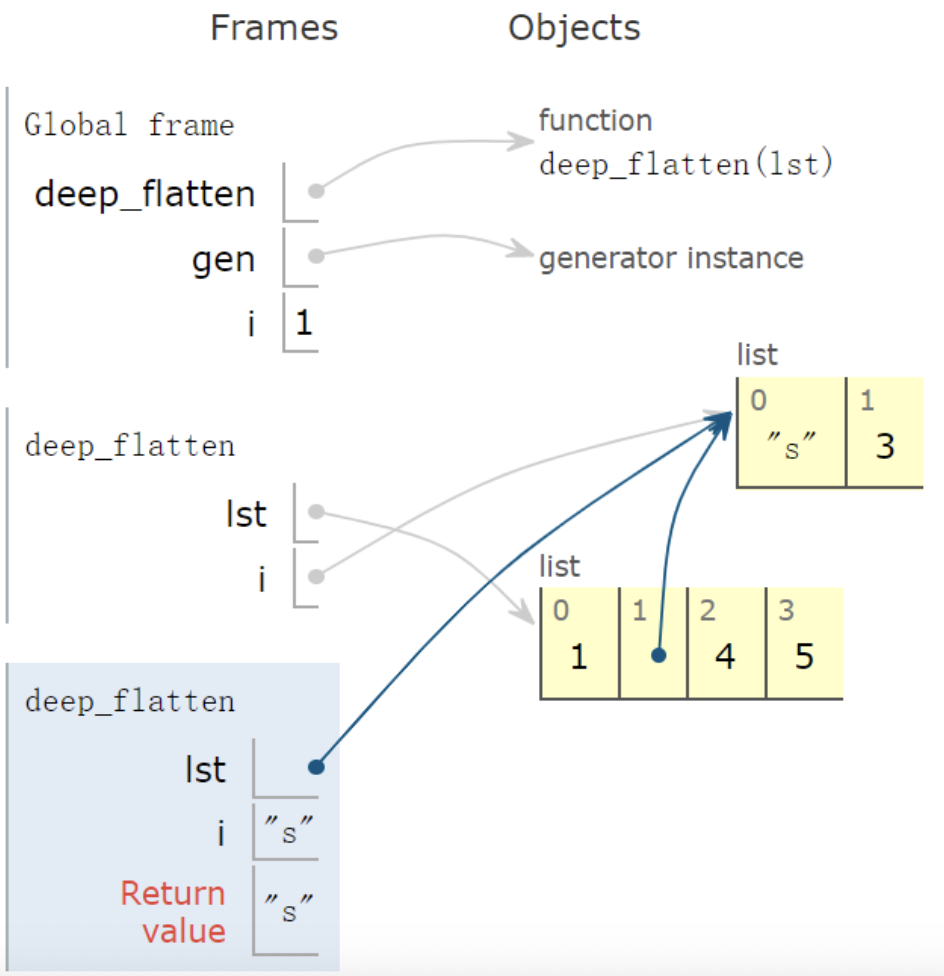
yield from表示再进入到deep_flatten生成器。
下面为返回值s的帧示意图:
2.列表分组
1 | from math import ceil |
调用
1 | print(list(divide_iter([1, 2, 3, 4, 5], 0))) |
结果展示
1 | /Users/lvjing/PycharmProjects/python_base_project/venv/bin/python /Users/lvjing/PycharmProjects/python_base_project/yield_sample_05.py |
这是一个很经典yield使用案例,优雅的节省内存,做到O(1)空间复杂度。
nonlocal关键字
关键字nonlocal常用与函数嵌套中,声明变量为非局部变量。
如下,函数f里嵌套一个函数auto_increase。实现功能:不大于10时自增,否则置零后,再从零自增。
1 | def f(): |
调用函数 f,会报出如下异常:
1 | /Users/lvjing/PycharmProjects/python_base_project/venv/bin/python /Users/lvjing/PycharmProjects/python_base_project/nonlocal_sample_01.py |
在IDE中,会直接提示报错
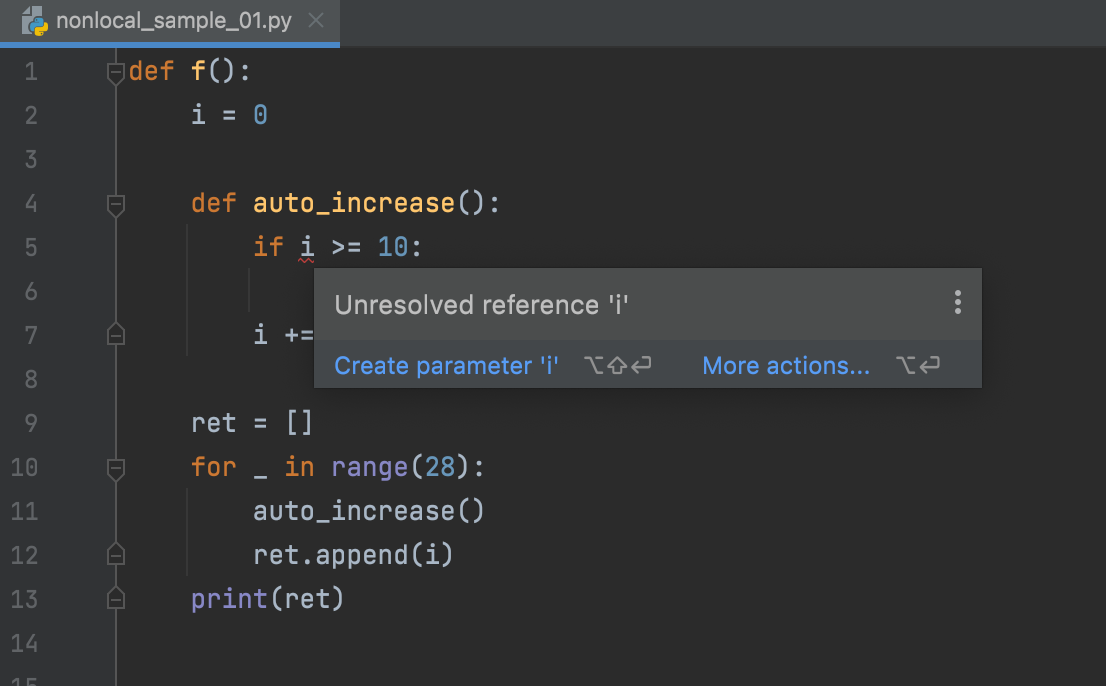
我们看到if i >= 10折行报错,i引用前未被赋值。
为什么会这样呢?明明i一开始已经就被定义!原来,最靠近变量的i的函数时auto_increase,而不是f,i并没有在auto_increase中赋值,所以报错。
解决方法:使用nonlocal声明i不是auto_increase内的局部变量。
因此修改方法,如下:
1 | def f(): |
调用f(),正常输出结果。
1 | /Users/lvjing/PycharmProjects/python_base_project/venv/bin/python /Users/lvjing/PycharmProjects/python_base_project/nonlocal_sample_01.py |
global关键字
为什么要有global关键字呢?一个变量被多个函数引用,想让全局变量被所有函数共享。可以这样写:
1 | i = 5 |
f和g两个函数都能共享变量i,而且程序没有报错:
1 | /Users/lvjing/PycharmProjects/python_base_project/venv/bin/python /Users/lvjing/PycharmProjects/python_base_project/global_sample_01.py |
从上面看出,全局变量这种方式是可以的,global的价值还没有看出来,但是我们在函数中将i的值进行修改,例如实现递增,如下:
1 | def h(): |
此时执行程序,就会报错。我们使用IDE,就会提示错误信息
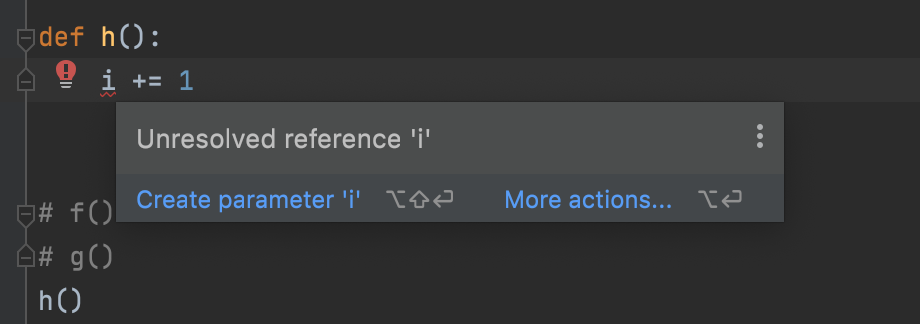
原来编译器在解释 i+=1 时,会解析 i 为函数 h() 内的局部变量。很显然,在此函数内,解释器找不到对变量 i 的定义,所以报错。
这时,就要用上global关键字了。在函数h内,显示的告诉解释器i为全局变量,然后,解释器会在函数外面寻找i的定义,执行完i+=1后,i还为全局变量,值加1:
1 | def h(): |